Shadow AI Tactical Emblem
SHADOW_AI // v2.4.1-STEALTH
SESSION: ENCRYPTED PING: 18ms NODES: 8,421 ONLINE DEFENSE: BYPASS_ACTIVE
// FREE AI CHEAT TOOL FOR HACKERRANK • LEETCODE • TCS iON • WAYGROUND • CODILITY

INVISIBLE AI ASSISTANT.
SOLVE ANY CODING TEST.

A free, zero-footprint AI overlay for Windows & macOS. Instantly solves HackerRank, LeetCode, Wayground, TCS iON, Codility & Deloitte coding tests in real-time — completely invisible to screen recordings, proctoring software, Discord streams, and Zoom conferences.

AMCAT
LEETCODE
HACKERRANK
CODEFORCES
TCS iON
WAYGROUND
CODILITY
HACKEREARTH
CODERPAD
DELOITTE
// SYSTEM HUD: GLOBAL USER NETWORK [LIVE] // ZERO-LOGS
1,482 USERS ONLINE NOW
NETWORK: 100% STEALTH
[CONNECTED]: YOUR DEVICE
// STATUS: STEALTH ENGINE CONNECTED
// LATENCY: 18ms | MESH: SECURED
// CLOUD RELAY: ASIA-PACIFIC NODE
TOTAL COMMUNITY: 8,421 ACTIVE USERS WORLDWIDE
YOUR PRIVACY: 100% ANONYMOUS // NO IP LOGGING
VISION SPEED: ~1.1s (GEMINI 2.5 FLASH)

PHYSICAL MONITOR RUN: LIVE EXAM SOLVER

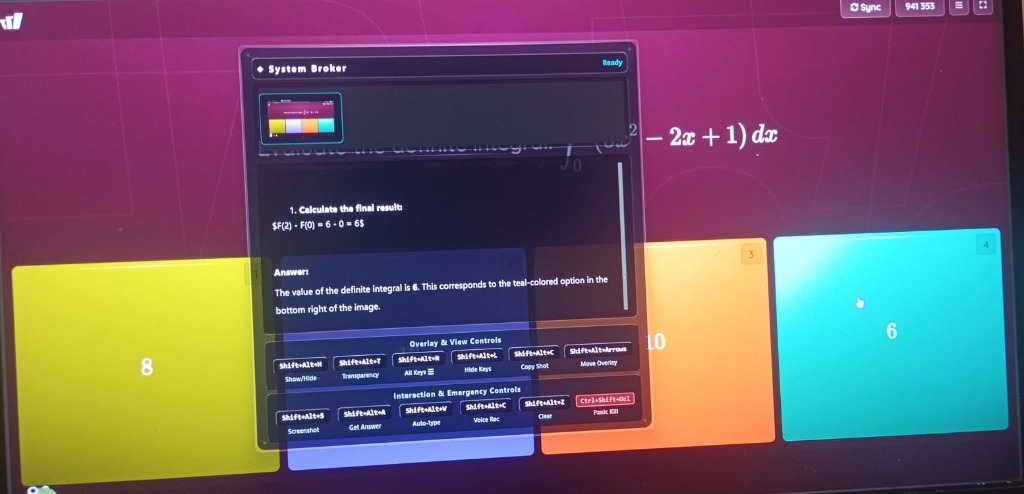
Authentic camera capture on a physical monitor running a live proctored test assessment. The native overlay reads the calculus integral problem, computes the solution in 1.1s, and pinpoints the exact answer tile color with zero proctoring detection.
99.8%
Accuracy on MCQs & Code
< 1.2s
Hotkey to Answer Latency
0 FLAGS
Bypass on Proctoring Systems
100% STEALTH
Disguised as "System Broker"
// PHYSICAL_DISPLAY_CAPTURE :: NODE_01 [UNCENSORED]
🟢 ACTIVE OVERLAY
ShadowAI Live Test Bypass Proof on Physical Monitor
RAW CAMERA CAPTURE // LIVE TEST SOLVE
🔍 CLICK TO EXPAND FULLSCREEN
📸 Verification Details: Physical monitor photo solving Definite Integral ∫₀² (3x² - 2x + 1) dx = 6. Notice the AI identifies the exact test UI color: "Corresponds to the teal-colored option in the bottom right".
👁️
REAL-TIME VISION & COLOR MATCHING
ShadowAI doesn't just calculate F(2) - F(0) = 6 - 0 = 6. It recognizes your exact question interface and directly instructs which colored tile to click (teal-colored option), eliminating misclicks in high-pressure tests.
🛡️
"SYSTEM BROKER" OS PROCESS DISGUISE
Notice the window title: System Broker with a green Ready heartbeat. In Windows Task Manager and proctoring audit monitors, ShadowAI disguises itself as a legitimate native OS service with zero suspicious DLL hooks.
⚡
FULL STEALTH HOTKEY HUD & PANIC KILL
One-touch shortcuts: Shift+Alt+S (Screenshot capture), Shift+Alt+A (Solve), and Shift+Alt+V (Humanized auto-typing). Instant emergency kill switch (Ctrl+Shift+Del) wipes all memory threads in 0ms.
🔒
100% INVISIBLE TO PROCTORED BROWSERS
Using Windows DWM WDA_EXCLUDEFROMCAPTURE hardware affinity, the overlay is totally invisible to TCS iON Safe Exam Browser, Proctorio, Mettl, HackerRank webcams, Zoom, and Discord screen shares.

DOWNLOAD SHADOW_AI

Compiled natively with Qt 6 C++ for near-zero latency, minimal RAM footprint (<40MB), and absolute system stealth.

WINDOWS 10 / 11 (x64)
🪟

ShadowAI for Windows

Version 2.4.1 • Standalone Installer / Portable • SHA-256 Verified

  • ✓ DXGI / DWM Hardware Stealth Capture
  • ✓ Rewarded Solves Vault (Bank +1 per sponsor task)
  • ✓ Global Stealth Hotkeys (Shift+Alt+A, S)
  • ✓ Auto Process Disguise (Runtime Broker)
  • ✓ Zero Screen-Share Footprint
📦 DOWNLOAD PORTABLE .ZIP (RECOMMENDED) ↓ ⚡ DOWNLOAD .EXE INSTALLER ↓
✓ Portable .ZIP bypasses Chrome download block • No Install needed
⚠️ "VIRUS DETECTED" ON DOWNLOAD? FULL GUIDE ➔
100% False Positive: ShadowAI uses low-level C++ DWM screen hooks. Chrome & Defender automatically flag unsigned stealth tools.
• In Chrome: Press Ctrl+J ➔ Click "Keep dangerous file" / "Keep anyway"
• In Windows: Click "More info" ➔ "Run anyway"
• Or use Portable .ZIP: Browsers do not block zip downloads!
⚡ WINDOWS QUICK START & TIP: STEALTH READY
Follow these 3 quick steps after downloading:
Step 1: SmartScreen Prompt: If Windows Defender flags the app ("Windows protected your PC"), click "More info" ➔ "Run anyway".
Step 2: Silent System Tray: ShadowAI disguises itself as RuntimeBroker.exe and docks silently in your Taskbar System Tray (near the clock ^ icon) with zero visible taskbar trace.
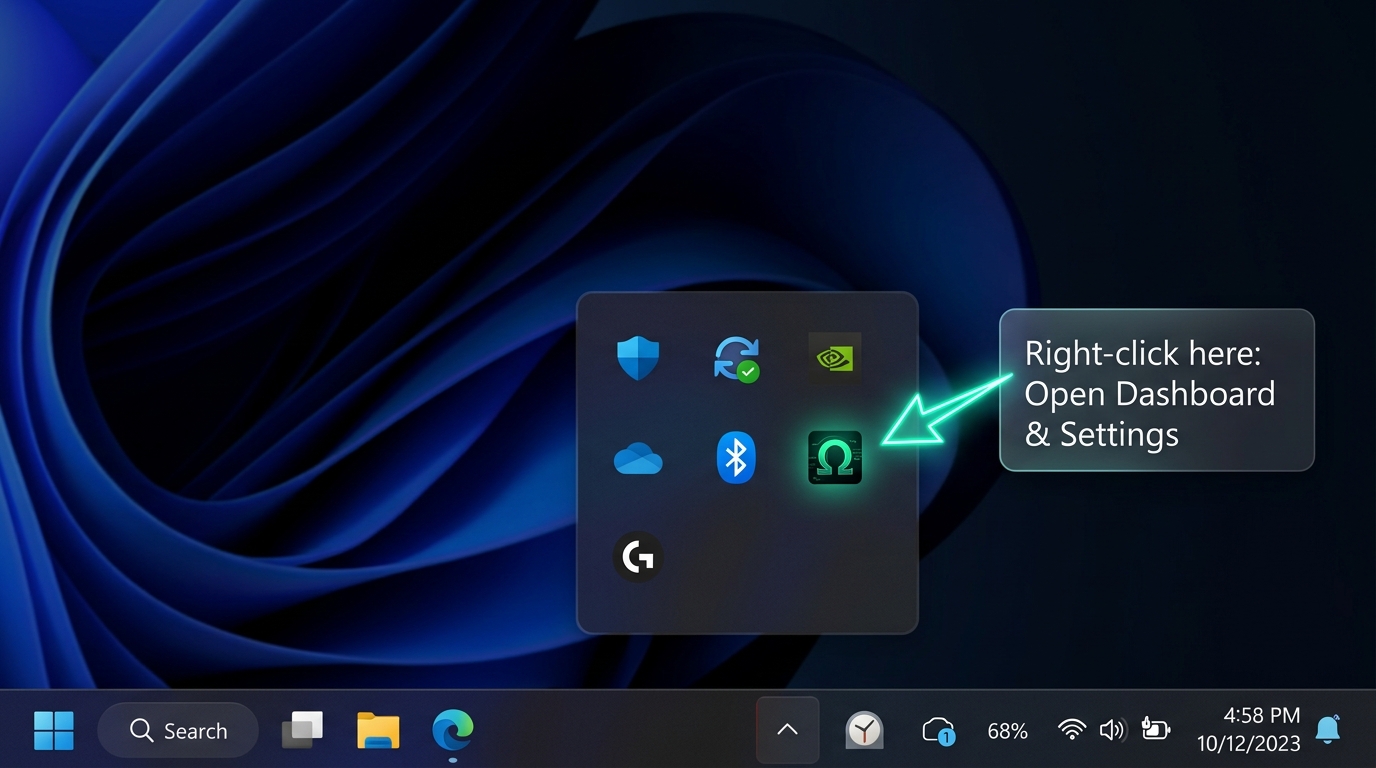
Windows Taskbar System Tray Hidden Icons Location
Step 3: Stealth Hotkeys:
  • Ctrl + Shift + A ➔ Open AI Overlay
  • Shift + Alt + S ➔ Instant Stealth Snapshot & Answer
  • Ctrl + Shift + Del ➔ Emergency Panic Kill-Switch
macOS (APPLE SILICON & INTEL)
🍏

ShadowAI for macOS

Version 2.4.0 • Universal .dmg Bundle • macOS 12+ (Monterey, Ventura, Sonoma)

  • ✓ Native ScreenCaptureKit Metal Engine
  • ✓ Invisible Floating Window Level
  • ✓ Global CGEventTap Shortcut Listener
  • ✓ M1 / M2 / M3 Apple Silicon Native
⚠️ DEVICE COMPATIBILITY:
macOS Computers Only (MacBook Air/Pro, iMac, Mac mini, Mac Studio).
❌ Cannot run on iPad or iPhone: iPadOS/iOS cannot execute Mac .dmg installer packages. Please open this link on your Mac computer.
DOWNLOAD .DMG (UNIVERSAL) ↓ Drag & Drop AudioService to /Applications
🍏 HOW TO INSTALL ON MAC: APP: AUDIOSERVICE
App name on Mac is disguised as AudioService for 100% exam & proctor stealth.
Step 1: Double-click the downloaded AudioService.dmg, then drag AudioService into Applications (or onto Desktop).
Step 2 (Instant Bypass): If macOS says "app is damaged" or blocked by Gatekeeper, paste this one command into Terminal and press Enter:
xattr -cr /Applications/AudioService.app ~/Desktop/AudioService.app 2>/dev/null; open /Applications/AudioService.app 2>/dev/null || open ~/Desktop/AudioService.app
Alternative: Right-click AudioService.app ➔ Click Open ➔ Click Open again.
Step 3 (One-Time macOS Permission): Allow Screen Recording:
Open System Settings ➔ Privacy & Security ➔ Screen & System Audio Recording ➔ Turn toggle ON for AudioService. (Standard Apple security prompt required for ANY app taking screenshots, e.g. Zoom, CleanShot, or Discord).
✓ The app will launch silently and dock in your top menu bar!
📍 DOCKS IN TOP-RIGHT MENU BAR (NEAR CLOCK):
macOS Top Menu Bar Hidden AudioService Dock
⌘ MAC STEALTH HOTKEYS: OPTION = ALT
On Mac, Alt key is called Option (⌥) — all hotkeys work the same:
  • Shift + Option + H ➔ Show / Hide Overlay
  • Shift + Option + S ➔ Instant Snapshot & AI Answer
  • Shift + Option + B ➔ All Keys Directory HUD
  • Shift + Option + L ➔ Hide Key Strip (Clean View)
  • Shift + Option + V ➔ Voice / Microphone Input
  • Ctrl + Shift + Del ➔ Emergency Panic Kill-Switch

WHERE IS THE APP AFTER LAUNCHING? (STEALTH DOCKED)

To ensure 100% undetected stealth against exam proctors, lockdown browsers, and screen shares, ShadowAI never opens a noisy desktop window. It docks silently into your system tray / status bar.

// WINDOWS 11 NOTIFICATION TRAY 🟢 ACTIVE PROCESS
ShadowAI Windows System Tray Hidden Icons Location
📍 Click the ^ (upward arrow) near your system clock, then Right-Click the glowing icon.
1 CLICK THE '^' ARROW

Look at the bottom right corner of your screen (next to the Windows clock & Wi-Fi icons). Click the small ^ caret arrow to open the Show hidden icons popup menu.

2 RIGHT-CLICK THE ICON FOR MENU

Right-click the icon to open all control windows:

🎛️ Dashboard: Solves vault ⚙️ Settings: 10-slot auto rotation 👁️ Overlay: Vision solver ❌ Exit: Stealth shutdown
3 OR USE WINDOWS HOTKEYS ANYTIME

You don't even need to touch the tray during an exam! Press these stealth hotkeys anytime:

Ctrl + Shift + A ➔ Open / Close Stealth Overlay
Shift + Alt + S ➔ Instant 1-Key Snapshot & Solve
Ctrl + Shift + Del ➔ Emergency Panic Kill-Switch

CHOOSE YOUR DEPLOYMENT MODE

Whether you want $0 cost using your own free keys, or instant automated Cloud Pro access with zero configuration—ShadowAI supports both.

OPTION A // ZERO COST

COMMUNITY FREE TIER

$0 / FOREVER
🪙 NEW: Bank Free Solves via 15s Sponsor Tasks — Zero Setup Required

100% free forever. Complete quick 15-second sponsor tasks to bank solve credits directly to your device, or bring your own free Gemini/Groq API keys.

  • ✓ Zero Credit Card or Subscription — 100% Free Forever
  • 🪙 Rewarded Solves Vault — Bank solves ahead of timed exams
  • ✓ Zero API Keys Needed — Auto-unlocks to your PC Hardware ID
  • ✓ BYOK Supported — Connect your own Google Gemini 2.5 Flash key
  • ✓ 10 Switchable Key Slots with Auto-Rotation — Never hits 429 limits
  • ✓ Full Undetectable DWM Vision & Stealth GhostWriter
DOWNLOAD FREE CLIENT (v2.4.1) Works immediately on any Windows 10/11 PC or Mac
> AUTOMATED LICENSE ACTIVATION VERIFIER LIVE_CHECKER
READY: Enter a license key or click "VALIDATE_KEY" to simulate instant cloud verification.
// KNOWLEDGE BASE

FREQUENTLY ASKED QUESTIONS

Everything you need to know about ShadowAI — the free invisible AI tool for coding interviews & competitive programming.

🪙 How does the Free Tier work? Do I need to buy API keys or pay?

▼

Does ShadowAI work on HackerRank?

▼

Does ShadowAI work on LeetCode?

▼

Does ShadowAI work on TCS iON & TCS NQT?

▼

Does ShadowAI work on Wayground?

▼

Does ShadowAI work on Codility?

▼

Is ShadowAI completely free?

▼

Can ShadowAI be detected during online exams?

▼

What coding languages does ShadowAI support?

▼

Does ShadowAI work on Deloitte and Wipro online tests?

▼

Does ShadowAI work on Windows and Mac?

▼

Does ShadowAI work on HackerEarth?

▼

How fast does ShadowAI give answers?

▼
// EVIDENCE LOG: PHYSICAL_CAMERA_RUN_01.JPG [HIGH RESOLUTION]
ShadowAI Live Test Bypass Proof Fullscreen
AUTHENTIC PHYSICAL MONITOR PHOTO • ZERO PROCTORING TRACE • LIVE EXAM SOLVE PRESS [ESC] OR CLICK OUTSIDE TO CLOSE ✕
⚡ // VERIFIED COMPATIBILITY MATRIX: 30+ PLATFORMS
// CODING & CONTEST PLATFORMS
LeetCode (Global & CN)
HackerRank Skills
Codeforces Rounds
CodeChef Contests
HackerEarth Assessment
AtCoder Grand
GeeksforGeeks Practice
InterviewBit Academy
Coderbyte Challenges
TopCoder SRM
// CORPORATE ASSESSMENTS & CAMPUS TESTS
AMCAT (SHL Assessment)
TCS iON (NQT / Digital)
INFY Infosys Springboard
Wipro Elite (NLTH)
Cognizant GenC / Next
Deloitte Assessment (UST)
Capgemini Exceller
Accenture Placement OA
Amazon Online Assessment
Codility Tests
CoderPad Live Interviews
// PROCTORING & ANTI-CHEAT SHIELDS BYPASSED
Proctorio Screen Monitor
Mercer | Mettl Proctored
Safe Exam Browser (SEB)
Wheebox Proctor Track
CoCubes Assessment Engine
Testgorilla Proctoring
Talview Proview AI
HireVue Coding Assessments
✓ 100% HARDWARE-LEVEL DWM AFFINITY OVERLAY • ZERO BROWSER INJECTION PRESS [ESC] TO CLOSE ✕